
Loading JSON Data with JavaScript
In this tutorial, you will load data from a JSON file and display it on a webpage using JavaScript.
The JSON file contains information about a smart home, including devices and security events.
Create the Project Files
Create a new folder called:
json-demo
Inside the folder create:
index.html
smart_security_data.json
Copy the JSON file into the project folder.
Your folder structure should look like:
json-demo
├── index.html
└── smart_security_data.json
Create the HTML Page
Open:
index.html
Add the following code:
<!DOCTYPE html>
<html>
<head>
    <title>JSON Demo</title>
</head>
<body>

<h1>Smart Home Dashboard</h1>

<div id="output"></div>

<script src="script.js"></script>

</body>
</html>
Save the file.
Create the JavaScript File
Create a new file called:
script.js
Your folder should now look like:
json-demo
├── index.html
├── script.js
└── smart_security_data.json
Load the JSON File
Open:
script.js
Add:
fetch("smart_security_data.json")
    .then(response => response.json())
    .then(data => {

        console.log(data);

    });
Save the file.
This code loads the JSON file and converts it into a JavaScript object.
Open Developer Tools
Open:
index.html
in your browser.
Press:
F12
and select the Console tab.
You should see the JSON data displayed.
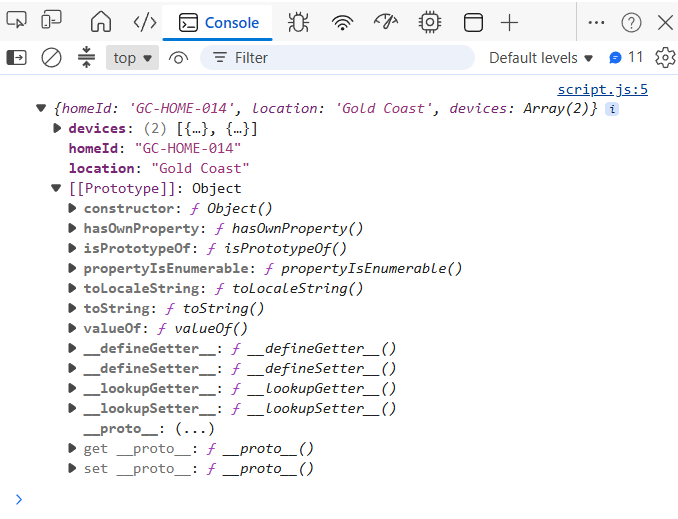
Display the Home Information
Replace the contents of:
.then(data => {

});
with:
.then(data => {

    document.getElementById("output").innerHTML = `
        <p><strong>Home ID:</strong> ${data.homeId}</p>
        <p><strong>Location:</strong> ${data.location}</p>
    `;

});
Save the file.
Refresh the page.
You should now see:
Home ID: GC-HOME-014
Location: Gold Coast
Display the Devices
Update the code:
fetch("smart_security_data.json")
    .then(response => response.json())
    .then(data => {

        let html = `
            <p><strong>Home ID:</strong> ${data.homeId}</p>
            <p><strong>Location:</strong> ${data.location}</p>

            <h2>Devices</h2>
            <ul>
        `;

        data.devices.forEach(device => {

            html += `
                <li>
                    ${device.deviceId}
                    (${device.deviceType})
                </li>
            `;

        });

        html += "</ul>";

        document.getElementById("output").innerHTML = html;

    });
Refresh the page.
You should now see:
Home ID: GC-HOME-014
Location: Gold Coast

Devices

CAM-01 (Security Camera)
LOCK-02 (Smart Door Lock)
Complete JavaScript File
fetch("smart_security_data.json")
    .then(response => response.json())
    .then(data => {

        let html = `
            <p><strong>Home ID:</strong> ${data.homeId}</p>
            <p><strong>Location:</strong> ${data.location}</p>

            <h2>Devices</h2>
            <ul>
        `;

        data.devices.forEach(device => {

            html += `
                <li>
                    ${device.deviceId}
                    (${device.deviceType})
                </li>
            `;

        });

        html += "</ul>";

        document.getElementById("output").innerHTML = html;

    });
You have successfully loaded a JSON file and displayed data using JavaScript.