
Creating a Security Events Table
In this tutorial, you will create a MySQL table to store security event data imported from a JSON file.
The JSON file contains homes, devices and events. Rather than storing the entire JSON structure, each event will be stored as a separate row in a database table.
This approach makes it easier to search, filter and analyse the data using SQL.
Open phpMyAdmin
Open phpMyAdmin in your browser.
Example:
http://localhost/phpmyadmin/
Select your existing database:
project_db
Create the Security Events Table
Select the SQL tab and run:
CREATE TABLE security_events (

    event_id INT AUTO_INCREMENT PRIMARY KEY,

    device_id VARCHAR(50) NOT NULL,

    device_type VARCHAR(100) NOT NULL,

    room VARCHAR(100) NOT NULL,

    event_timestamp DATETIME NOT NULL,

    event_type VARCHAR(100) NOT NULL,

    data_transmitted VARCHAR(100) NOT NULL,

    severity VARCHAR(20) NOT NULL,

    access_result VARCHAR(20) NOT NULL

);
This creates a table capable of storing all event information from the JSON file.
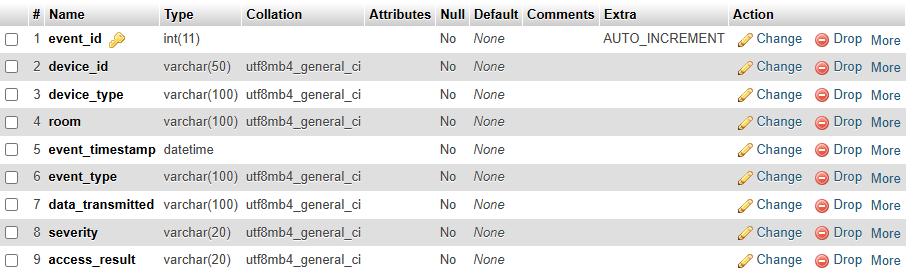
Review the Table Structure
The completed table should contain the following fields:
| Field | Purpose |
|---|---|
| event_id | Unique identifier for each event |
| device_id | Device that generated the event |
| device_type | Type of device |
| room | Location of the device |
| event_timestamp | Date and time of the event |
| event_type | Type of activity |
| data_transmitted | Data involved in the event |
| severity | Event severity level |
| access_result | Result of the event |
View the Table Structure
Run:
DESCRIBE security_events;
You should see a structure similar to:
| Field | Type |
|---|---|
| event_id | int |
| device_id | varchar(50) |
| device_type | varchar(100) |
| room | varchar(100) |
| event_timestamp | datetime |
| event_type | varchar(100) |
| data_transmitted | varchar(100) |
| severity | varchar(20) |
| access_result | varchar(20) |
Insert a Test Record
Before importing JSON data, insert a test record to verify the table works correctly.
Run:
INSERT INTO security_events (

    device_id,
    device_type,
    room,
    event_timestamp,
    event_type,
    data_transmitted,
    severity,
    access_result

)
VALUES (

    'CAM-01',
    'Security Camera',
    'Front Entrance',
    '2026-03-14 02:18:45',
    'motion_detected',
    'video_stream',
    'high',
    'authorised'

);
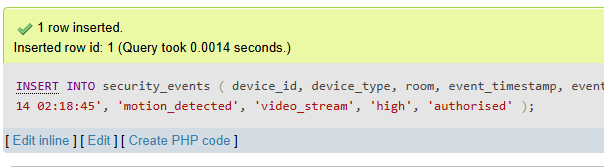
If successful, MySQL will report:
1 row inserted
View the Data
Run:
SELECT * FROM security_events;
You should see:
| event_id | device_id | device_type | room | event_timestamp | event_type | severity |
|---|---|---|---|---|---|---|
| 1 | CAM-01 | Security Camera | Front Entrance | 2026-03-14 02:18:45 | motion_detected | high |
Delete the Test Record
The test record is no longer required.
Run:
DELETE FROM security_events;
Verify the table is empty:
SELECT * FROM security_events;
You should see:
Empty set
Complete SQL Script
CREATE TABLE security_events (

    event_id INT AUTO_INCREMENT PRIMARY KEY,

    device_id VARCHAR(50) NOT NULL,

    device_type VARCHAR(100) NOT NULL,

    room VARCHAR(100) NOT NULL,

    event_timestamp DATETIME NOT NULL,

    event_type VARCHAR(100) NOT NULL,

    data_transmitted VARCHAR(100) NOT NULL,

    severity VARCHAR(20) NOT NULL,

    access_result VARCHAR(20) NOT NULL

);

INSERT INTO security_events (

    device_id,
    device_type,
    room,
    event_timestamp,
    event_type,
    data_transmitted,
    severity,
    access_result

)
VALUES (

    'CAM-01',
    'Security Camera',
    'Front Entrance',
    '2026-03-14 02:18:45',
    'motion_detected',
    'video_stream',
    'high',
    'authorised'

);

SELECT * FROM security_events;

DELETE FROM security_events;
You now have a database table ready to receive event data from a JSON file.