
Displaying JSON Data in a Table
In this tutorial, you will display the device data in an HTML table using JavaScript.
Current Project Structure
Your project should contain:
json-demo
├── index.html
├── script.js
└── smart_security_data.json
Create a Table Container
Open:
index.html
Update the page so it contains:
<!DOCTYPE html>
<html>
<head>
    <title>JSON Demo</title>
</head>
<body>

<h1>Smart Home Dashboard</h1>

<div id="output"></div>

<script src="script.js"></script>

</body>
</html>
The table will be generated inside the output div.
Create the Table Structure
Open:
script.js
Replace the previous code with:
fetch("smart_security_data.json")
    .then(response => response.json())
    .then(data => {

        let html = `
            <h2>Devices</h2>

            <table border="1">

                <tr>
                    <th>Device ID</th>
                    <th>Device Type</th>
                    <th>Room</th>
                </tr>
        `;

        data.devices.forEach(device => {

            html += `
                <tr>
                    <td>${device.deviceId}</td>
                    <td>${device.deviceType}</td>
                    <td>${device.room}</td>
                </tr>
            `;

        });

        html += "</table>";

        document.getElementById("output").innerHTML = html;

    });
Save the file.
View the Results
Open:
http://localhost/json-demo/
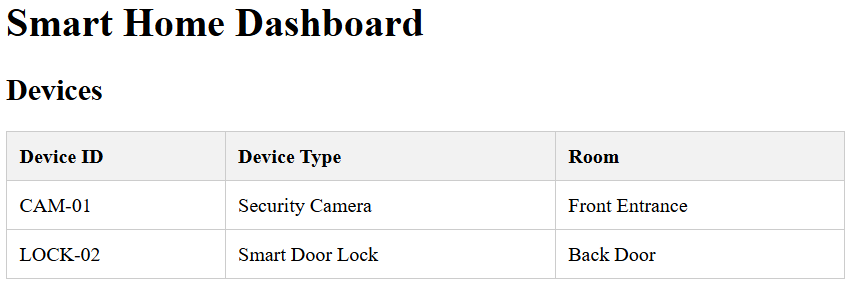
You should see:
| Device ID | Device Type | Room |
|---|---|---|
| CAM-01 | Security Camera | Front Entrance |
| LOCK-02 | Smart Door Lock | Back Door |
Add Basic Styling
The table works, but it looks very plain.
Add the following CSS inside the <head> section of index.html:
<style>

table {
    border-collapse: collapse;
    width: 100%;
}

th,
td {
    border: 1px solid #cccccc;
    padding: 10px;
    text-align: left;
}

th {
    background-color: #f2f2f2;
}

</style>
Refresh the page.
The table should now be easier to read.
Display the Home Information Above the Table
Update the start of the HTML string:
let html = `
    <p>
        <strong>Home ID:</strong>
        ${data.homeId}
    </p>

    <p>
        <strong>Location:</strong>
        ${data.location}
    </p>

    <h2>Devices</h2>

    <table border="1">

        <tr>
            <th>Device ID</th>
            <th>Device Type</th>
            <th>Room</th>
        </tr>
`;
The page should now display:
Home ID: GC-HOME-014
Location: Gold Coast

Devices
followed by the table.
Complete JavaScript File
fetch("smart_security_data.json")
    .then(response => response.json())
    .then(data => {

        let html = `
            <p>
                <strong>Home ID:</strong>
                ${data.homeId}
            </p>

            <p>
                <strong>Location:</strong>
                ${data.location}
            </p>

            <h2>Devices</h2>

            <table border="1">

                <tr>
                    <th>Device ID</th>
                    <th>Device Type</th>
                    <th>Room</th>
                </tr>
        `;

        data.devices.forEach(device => {

            html += `
                <tr>
                    <td>${device.deviceId}</td>
                    <td>${device.deviceType}</td>
                    <td>${device.room}</td>
                </tr>
            `;

        });

        html += "</table>";

        document.getElementById("output").innerHTML = html;

    });
You have successfully loaded JSON data and displayed it in an HTML table.