
Using PHP Sessions to Keep Users Logged In
InPHP thesessions previous tutorial, you createdstore a small amount of trusted server-side state between requests. A login formsystem that verified usernames and passwords. In this tutorial, you willcan use PHP sessionsthem to remember whothe isauthenticated loggeduser’s inidentifier, username and keep them signed in while they navigate your website.role.
What is a Session?
A session allows PHP to store information about a user while they move between pages.
Without sessions, a website would forget who the user is every time a new page loads.
Start athe Sessionsession
OpenCall yoursession_start() existing:
login.phpHTML Addother the following code at the very top of the file:output:
<?php
session_start();
?>
Set identity after successful login
TheOnly set these values after a database user has been found and session_start(password_verify()function must be called before any HTML is sent to the browser.
Your file should now begin with:succeeds:
<?php

session_start()session_regenerate_id(true);

$conn = new mysqli(
    "localhost",
    "root",
    "",
    "project_db"
);
Store User Information in the Session
Locate this section:
if (
    password_verify(
        $password,
        $user["password"]
    )
) {

    echo "<p>Login successful.</p>";

}
Replace it with:
if (
    password_verify(
        $password,
        $user["password"]
    )
) {

$_SESSION["user_id"] = (int) $user["user_id"];
$_SESSION["username"] = $user["username"];
echo$_SESSION["role"] = $user["<p>Login successful.</p>"role"];

}
WhenThe role must come from the database. Never trust a userrole logssupplied in successfully, their information is now stored in the session.
Createby a Memberslogin Page
or Createregistration a new file called:form.
members.phpRead
sessionAddvalues the following code:
<?php
session_start();

?>$username <!DOCTYPE html>
<html>
<head>
    <title>Members Area</title>
</head>
<body>

<h1>Members Area</h1>

<p>Welcome,
<?php echo= $_SESSION["username"] ?? "";
$role = $_SESSION["role"] ?? "user";
?>
</p>
  </body>
</html>
Save the file.
Open the Members Page
Visit:
http://localhost/members.php
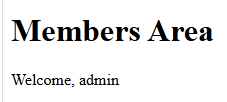
If you have loggedSigned in successfully, you should see:
Members Area

Welcome, admin
or whatever username was used to log in.
Display Additional Session Information
You can access any values stored in the session.
For example:
<p>User ID:as
  <?php= echohtmlspecialchars($username, $_SESSION[ENT_QUOTES, "user_id"];UTF-8") ?>
</p>
Result:Session values still need escaping when inserted into HTML.
UserWhat ID:belongs 1in
a session
Suitable:
Avoid:
ViewImportant limits
A session records authentication state; it does not automatically protect a page. Every protected server-side route must check the Sessionrequired Dataidentity
Addand the following code to the members page:
<pre>
<?php
print_r($_SESSION);
?>
</pre>
Example output:
Array
(
    [user_id] => 1
    [username] => admin
)
This can be useful when testing.role.
Redirect Users After LoginCheck
Instead
echostarts "<p>Loginbefore successful.</p>";output.replaceID theis success code with:
$_SESSION["user_id"] = $user["user_id"];
$_SESSION["username"] = $user["username"];

header("Location: members.php");
exit();
Now users will be automatically redirected to the members pageregenerated after a successful login.
TestIdentity and role come from the Complete Process
http://localhost/login.phpis Logstored in usingthe an existing account.
YouSession shouldtext beis redirectedescaped to:
http://localhost/members.phpProtected
Screenshot Placeholder
Insert screenshot showing the successful login redirect.
Complete Login Success Code
if (
    password_verify(
        $password,
        $user["password"]
    )
) {

    $_SESSION["user_id"] = $user["user_id"];
    $_SESSION["username"] = $user["username"];

    header("Location: members.php");
    exit();

}
Complete Members Page
<?php

session_start();

?>

<!DOCTYPE html>
<html>
<head>
    <title>Members Area</title>
</head>
<body>

<h1>Members Area</h1>

<p>Welcome,
<?php echo $_SESSION["username"]; ?>
</p>

<p>User ID:
<?php echo $_SESSION["user_id"]; ?>
</p>

</body>
</html>
You now have a working login system that remembers users between pages using PHP sessions.
Next tutorial: Protecting Pages and Preventing Unauthorised Access.