
Creating a User Registration Form
InThis standalone registration page accepts a fictional username and password, validates both on the previousserver, tutorial,hashes youthe createdpassword and inserts a usersstandard tableuser andaccount learnedwith howPDO.
Database connection
The example expects includes/db.php to securely store passwords using password hashing. In this tutorial, you will create a registrationPDO formobject thatnamed allows new users to create an account and store their details in the database.$pdo.
Create the Registration Formpage
Create a new file called:
register.php
Add the following code:
<?php
require __DIR__ . "/includes/db.php";

$username = "";
$errors = [];
$created = false;

if ($_SERVER["REQUEST_METHOD"] === "POST") {
    $username = trim($_POST["username"] ?? "");
    $password = $_POST["password"] ?? "";
    $confirm = $_POST["confirm_password"] ?? "";

    if (!DOCTYPEpreg_match('/^[A-Za-z0-9_]{3,50}$/', $username)) {
        $errors[] = "Username must be 3–50 letters, numbers or underscores.";
    }
    if (strlen($password) < 10) {
        $errors[] = "Password must contain at least 10 characters.";
    }
    if ($password !== $confirm) {
        $errors[] = "Passwords do not match.";
    }

    if (!$errors) {
        $check = $pdo->prepare(
            "SELECT user_id FROM users WHERE username = :username"
        );
        $check->execute(["username" => $username]);

        if ($check->fetch()) {
            $errors[] = "That username is unavailable.";
        } else {
            $insert = $pdo->prepare(
                "INSERT INTO users (username, password, role)
                 VALUES (:username, :password, 'user')"
            );
            $insert->execute([
                "username" => $username,
                "password" => password_hash($password, PASSWORD_DEFAULT)
            ]);
            $created = true;
            $username = "";
        }
    }
}
?>
<!doctype html>
<html lang="en">
<head>
  <meta charset="utf-8">
  <meta name="viewport" content="width=device-width, initial-scale=1">
  <title>UserCreate Registrationaccount</title>
</head>
<body>
<h1>Create Accountaccount</h1>

<?php if ($created): ?>
  <p role="status">Account created. You can now log in.</p>
<?php endif; ?>

<?php if ($errors): ?>
  <div role="alert">
    <p>Please correct the following:</p>
    <ul>
      <?php foreach ($errors as $error): ?>
        <li><?= htmlspecialchars($error) ?></li>
      <?php endforeach; ?>
    </ul>
  </div>
<?php endif; ?>

<form action="register.php" method="post">
  <label for="username">Username</label><br>
  <input type=id="text"username" name="username" maxlength="50"
         autocomplete="username" required
         value="<?= htmlspecialchars($username) ?><br><br">

  <label for="password">Password</label><br>
  <input type=id="password" name="password" type="password"
         autocomplete="new-password" required>

  <brlabel for="confirm_password">Confirm password<br/label>
  <input id="confirm_password" name="confirm_password" type="password"
         autocomplete="new-password" required>

  <button type="submit">RegisterCreate account</button>
</form>
</body>
</html>
SaveThe form never accepts a role. Every public registration receives the fileserver-controlled user role.
Test
Test valid input, short passwords, mismatched passwords, invalid usernames, duplicates and openmissing itfields. inConfirm yourthat browser.
Example:
http://localhost/register.phpcreate Youdatabase should see a simple registration form.
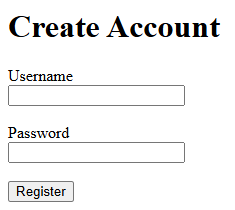
Connect to the DatabaseCheck
Add
<!DOCTYPEUsername html><?phphandled.This creates a connection to the project_db database.
Process the Form Submission
Add the following code underneath the database connection:
if ($_SERVER["REQUEST_METHOD"] == "POST") {

    $username = $_POST["username"];
    $password = $_POST["password"];

}
This code runs when the formPassword is submitted.
Hash the Password
Inside the if statement, add:
$hashedPassword = password_hash(
    $password,
    PASSWORD_DEFAULT
);
Your code should now look like:
if ($_SERVER["REQUEST_METHOD"] == "POST") {

    $username = $_POST["username"];
    $password = $_POST["password"];

    $hashedPassword = password_hash(
        $password,
        PASSWORD_DEFAULT
    );

}
The password will now be securely hashed before beinginsertion.
Prepared
Insertstatements theare Userused.
Add the following code underneath the password hashing:
$stmt = $conn->prepare(
    "INSERT INTO users (username, password)
     VALUES (?, ?)"
);

$stmt->bind_param(
    "ss",
    $username,
    $hashedPassword
);

$stmt->execute();
This inserts the username and hashed password into the users table.
Display a Success Message
Add:
echo "<p>Account created successfully.</p>";
The completed section should look like:
if ($_SERVER["REQUEST_METHOD"] == "POST") {

    $username = $_POST["username"];
    $password = $_POST["password"];

    $hashedPassword = password_hash(
        $password,
        PASSWORD_DEFAULT
    );

    $stmt = $conn->prepare(
        "INSERT INTO users (username, password)
         VALUES (?, ?)"
    );

    $stmt->bind_param(
        "ss",
        $username,
        $hashedPassword
    );

    $stmt->execute();

    echo "<p>Account created successfully.</p>";
}
Create a New User Account
Open:
http://localhost/register.php
Enter:
Username: testuser
Password: mypassword
Click Register.
You should see:
Account created successfully.
Check the Database
Open phpMyAdmin and view the users table.
Run:
SELECT * FROM users;
You should now see the new account.
Example:
Notice that the password is stored as a hash rather than plain text.

Complete Code
<?php

$conn = new mysqli(
    "localhost",
    "root",
    "",
    "project_db"
);

if ($conn->connect_error) {
    die("Connection failed: " . $conn->connect_error);
}

if ($_SERVER["REQUEST_METHOD"] == "POST") {

    $username = $_POST["username"];
    $password = $_POST["password"];

    $hashedPassword = password_hash(
        $password,
        PASSWORD_DEFAULT
    );

    $stmt = $conn->prepare(
        "INSERT INTO users (username, password)
         VALUES (?, ?)"
    );

    $stmt->bind_param(
        "ss",
        $username,
        $hashedPassword
    );

    $stmt->execute();

    echo "<p>Account created successfully.</p>";
}

?>

<!DOCTYPE html>
<html>
<head>
    <title>User Registration</title> </head>cannot <body>create <h1>Createan Account</h1>administrator.
<form
action="register.php" method="post">

    <label>Username</label><br>
    <input type="text" name="username" required><br><br>

    <label>Password</label><br>
    <input type="password" name="password" required><br><br>

    <button type="submit">Register</button>

</form>

</body>
</html>
You now have a working registration form that stores user accounts in the database using secure password hashing.
Next tutorial: Creating a Login Form.