
Creating a Navigation Menu Based on User Roles
Start with a role-based access control system using admin, teacher and student accounts. In this tutorial, you will build a navigation menu that changes depending on the role of the logged-in user.
This allows different users to see different menu options.
Current Situation
At the moment, every user sees the sameprotected page after logging in.
Example:
Welcome,<?php
adminrequire Role:__DIR__ admin. Logout"/includes/require-login.php";

$username = $_SESSION["username"] ?? "user";
$role = $_SESSION["role"] ?? "user";
?>
We can improve this by displaying different
Display navigation links based on the user's role.
Create a Navigation Section
Open:
members.php
Add the following code underneath the welcome message:
<h2>Navigation</h2nav aria-label="Main navigation">
  <ul>
    <li>
        <a href="members.dashboard.php">
            Home
        Dashboard</a>
    </li>
    </ul>
The page should now display a simple menu.
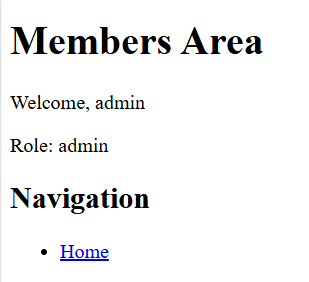
Add an Admin Link
Add the following code inside the navigation list:
<?php if ($_SESSION["role"] == "admin") { ?>

<li>
    <a href="admin.results.php">
        Admin Area
    Results</a>
</li>

<?php } ?>
This link will only appear for administrators.
Create a Teacher Page
Create a new file called:
teacher.php
Add the following code:
<?php

session_start();

if (!isset($_SESSION["user_id"])) {

    header("Location: login.php");
    exit();

}

if ($_SESSION["role"] != "teacher") {

    die("Access denied.");

}

?>

<!DOCTYPE html>
<html>
<head>
    <title>Teacher Area</title>
</head>
<body>

<h1>Teacher Area</h1>

<p>Welcome,
<?php echo $_SESSION["username"]; ?>
</p>

</body>
</html>
Save the file.
Add a Teacher Link
Add the following code to your navigation menu:
<?php if ($_SESSION["role"] == "teacher") { ?>

<li>
    <a href="teacher.php">
        Teacher Area
    </a>
</li>

<?php } ?>
Only teachers will see this link.
Create a Student Page
Create a new file called:
student.php
Add:
<?php

session_start();

if (!isset($_SESSION["user_id"])) {

    header("Location: login.php");
    exit();

}

if ($_SESSION["role"] != "student") {

    die("Access denied.");

}

?>

<!DOCTYPE html>
<html>
<head>
    <title>Student Area</title>
</head>
<body>

<h1>Student Area</h1>

<p>Welcome,
<?php echo $_SESSION["username"]; ?>
</p>

</body>
</html>
Save the file.
Add a Student Link
Add:
<?php if ($_SESSION["role"] == "student") { ?>

<li>
    <a href="student.php">
        Student Area
    </a>
</li>

<?php } ?>
Only students will see this link.
Add a Logout Link
Add:
<li>
    <a href="logout.php">
        Logout
    </a>
</li>
This link should be visible to all logged-in users.
Complete Navigation Menu
<h2>Navigation</h2>

<ul>

    <li>
        <a href="members.php">
            Home
        </a>
    </li>

    <?php if ($_SESSION["role"]role === "admin") {: ?>
      <li>
        <a href="admin.import.php">Import Admin Area
        dataset</a></li>
      <li><a href="manage-users.php">Manage users</a></li>
    <?php } ?>

    <?php if ($_SESSION["role"] == "teacher") {endif; ?>

    <li>
        <a href="teacher.php">
            Teacher Area
        </a>
    </li>

    <?php } ?>

    <?php if ($_SESSION["role"] == "student") { ?>

    <li>
        <a href="student.php">
            Student Area
        </a>
    </li>

    <?php } ?>

    <li>
        <a href="logout.php">Log Logout
        out</a>
    </li>
  </ul>
</nav>

<p>
  Signed in as
  <?= htmlspecialchars($username, ENT_QUOTES, "UTF-8") ?>
</p>
Protect
Testevery destination
The condition only controls whether the link appears. import.php and every other administrator route must also require includes/require-admin.php.
Do not use JavaScript or CSS visibility as an Administratoraccess-control
Logmechanism. Those technologies run in as:the user’s browser and can be changed.
adminDesign
You should see:
Home
Admin Area
Logout
Test as a Teacherguidance
Log in as:
teacher
You should see:
Home
Teacher Area
Logout
Test as a Student
Log in as:
student
You should see:
Home
Student Area
Logout
Prevent Direct Access
The following checks should still exist in:
admin.php
teacher.php
student.php
Example:
if ($_SESSION["role"] != "admin") {

    die("Access denied.");

}
This prevents users from manually typing the page URL into their browser.
Next Steps
You now have:
UserUseregistrationdescriptive link text.PasswordIdentifyhashingthe current page witharia-current="page".LoginKeepsystemnavigation order consistent.SessionsDo not display links that will always deny the current role.ProtectedProvidepagesa visible logout action.LogoutEnsurefunctionality
Test
Compare logged-out, standard-user and administrator views. Then type each protected URL directly to verify that hidden links are not the only control.