
Creating a Login Form
InThis thestandalone previouslogin tutorial,page youvalidates createdcredentials with PDO, starts a registrationsecure formsession thatand storesredirects usersauthenticated inusers. theIt database.uses Inone thisgeneric tutorial,failure youmessage willso createit adoes loginnot formreveal that checkswhether a username and password against the database and allows a user to log in.exists.
Create the Login Pagepage
Create a new file called:
login.php
Add the following code:
<?php
session_start();
require __DIR__ . "/includes/db.php";

$error = "";

if ($_SERVER["REQUEST_METHOD"] === "POST") {
    $username = trim($_POST["username"] ?? "");
    $password = $_POST["password"] ?? "";

    $stmt = $pdo->prepare(
        "SELECT user_id, username, password, role
         FROM users
         WHERE username = :username"
    );
    $stmt->execute(["username" => $username]);
    $user = $stmt->fetch();

    if ($user && password_verify($password, $user["password"])) {
        session_regenerate_id(true);
        $_SESSION["user_id"] = (int) $user["user_id"];
        $_SESSION["username"] = $user["username"];
        $_SESSION["role"] = $user["role"];

        header("Location: dashboard.php");
        exit;
    }

    $error = "Username or password was not accepted.";
}
?>
<!DOCTYPEdoctype html>
<html lang="en">
<head>
  <meta charset="utf-8">
  <meta name="viewport" content="width=device-width, initial-scale=1">
  <title>LoginLog in</title>
</head>
<body>
<h1>LoginLog in</h1>

<?php if ($error): ?>
  <p role="alert"><?= htmlspecialchars($error) ?></p>
<?php endif; ?>

<form action="login.php" method="post">
  <label for="username">Username</label><br>
  <input type=id="text"username" name="username" autocomplete="username" required><br><br>

  <label for="password">Password</label><br>
  <input type=id="password" name="password" type="password"
         autocomplete="current-password" required><br><br>

  <button type="submit">LoginLog in</button>
</form>
</body>
</html>
Save
Why the filesecurity andsteps openmatter
Example:
separate from SQL
http://localhost/login.phppassword_verify()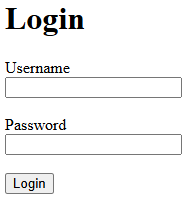
Connect tochecks the Database
stored Addhash
<!DOCTYPEfixation html><?php
$conn = new mysqli(
"localhost",
"root",
"",
"project_db"
);
if ($conn->connect_error) {
die("Connection failed: " . $conn->connect_error);
}
?>
This creates a connection to the database.
Process the Login Form
Add the following code underneath the database connection:
if ($_SERVER["REQUEST_METHOD"] == "POST") {

    $username = $_POST["username"];
    $password = $_POST["password"];

}
This code will run when the form is submitted.
Find the User
Inside the if statement, add:
$stmt = $conn->prepare(
    "SELECT * FROM users
     WHERE username = ?"
);

$stmt->bind_param(
    "s",
    $username
);

$stmt->execute();

$result = $stmt->get_result();
This searches the database for the username entered on the form.
Check if the User Exists
Add:
if ($result->num_rows == 1) {

    $user = $result->fetch_assoc();

}
else {

    echo "<p>User not found.</p>";

}
If the username exists, the user's record is loadedcomes from the database.
Verifynot the Passwordform
a generic error reduces account discovery
Test
Inside the successful login section, add:
if (
    password_verify(
        $password,
        $user["password"]
    )
) {

    echo "<p>Login successful.</p>";

}
else {

    echo "<p>Incorrect password.</p>";

}
This compares the entered password against the stored password hash.
Complete Login Logic
Your completed login section should look like:
if ($_SERVER["REQUEST_METHOD"] == "POST") {

    $username = $_POST["username"];
    $password = $_POST["password"];

    $stmt = $conn->prepare(
        "SELECT * FROM users
         WHERE username = ?"
    );

    $stmt->bind_param(
        "s",
        $username
    );

    $stmt->execute();

    $result = $stmt->get_result();

    if ($result->num_rows == 1) {

        $user = $result->fetch_assoc();

        if (
            password_verify(
                $password,
                $user["password"]
            )
        ) {

            echo "<p>Login successful.</p>";

        }
        else {

            echo "<p>Incorrect password.</p>";

        }

    }
    else {

        echo "<p>User not found.</p>";

    }

}
Test a Successfulvalid Login
standard Open:
http://localhost/login.php
Enteruser, a valid administrator, a wrong password, an unknown username and passwordempty fields. Confirm that alreadyfailed existattempts indo thenot database.
Example:
Username:identity admin
Password: password123
Click Login.
You should see:
Login successful.
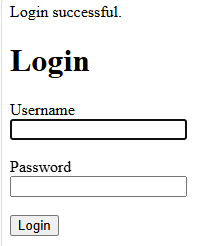
TestCheck
Enter:
Username:is adminverified Password:correctly.ClickID Login.
Youafter shouldlogin.
Incorrect password.
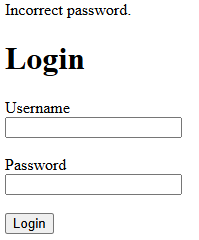
Test an Unknown
User Enter:
Username: unknownuser
Password: password123
Click Login.
You should see:
User not found.
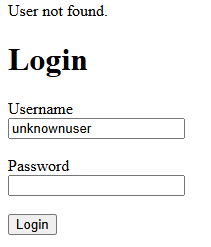
Complete Code
<?php

$conn = new mysqli(
    "localhost",
    "root",
    "",
    "project_db"
);

if ($conn->connect_error) {
    die("Connection failed: " . $conn->connect_error);
}

if ($_SERVER["REQUEST_METHOD"] == "POST") {

    $username = $_POST["username"];
    $password = $_POST["password"];

    $stmt = $conn->prepare(
        "SELECT * FROM users
         WHEREID, username = ?"
    );

    $stmt->bind_param(
        "s",
        $username
    );

    $stmt->execute();

    $result = $stmt->get_result();

    if ($result->num_rows == 1) {

        $user = $result->fetch_assoc();

        if (
            password_verify(
                $password,
                $user["password"]
            )
        ) {

            echo "<p>Login successful.</p>";

        }
        else {

            echo "<p>Incorrect password.</p>";

        }

    }
    else {

        echo "<p>User not found.</p>";

    }

}

?>

<!DOCTYPE html>
<html>
<head>
    <title>Login</title>
</head>
<body>

<h1>Login</h1>

<form action="login.php" method="post">

    <label>Username</label><br>
    <input type="text" name="username" required><br><br>

    <label>Password</label><br>
    <input type="password" name="password" required><br><br>

    <button type="submit">Login</button>

</form>

</body>
</html>
You now have a working login form that validates usernames and passwordsrole againstare yourstored.
NextFailure tutorial:message Usingis PHPgeneric.