
HTML Lists and Tables
Lists andorganise tablesrelated areitems. usedTables torepresent organiseinformation with meaningful row and displaycolumn information on a webpage.relationships.
Lists are useful for displaying related items, while tables are useful for displaying data in rows and columns.
Unordered Listsand ordered lists
An unordered list displays items using bullet points.
<ul>
  <li>HTMLTeam registration</li>
  <li>CSSMatch results</li>
  <li>JavaScriptLeaderboard</li>
</ul>
Result:
Ordered Lists
An ordered list displays items using numbers.
<ol>
  <li>PlanChoose thea websitefictional dataset.</li>
  <li>CreateValidate theits HTMLheadings.</li>
  <li>AddImport CSSvalid stylingrows.</li>
</ol>
Result:
with
Nested Lists
Lists can be placed inside other lists.
<ul>

    <li>Web Development

        <ul>
            <li>HTML</li>
            <li>CSS</li>
            <li>JavaScript</li>
        </ul>

    </li>

</ul>
Result:
Definition Lists
Definition lists are useful for displaying termshyphens and descriptions.line breaks.
Description list
<dl>
  <dt>HTMLAdministrator</dt>
  <dd>CreatesImports webpageand content.manages fictional tournament data.</dd>
  <dt>CSSUser</dt>
  <dd>ControlsViews appearanceprocessed results and styling.statistics.</dd>
</dl>
Result:
Accessible
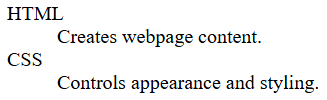
HTMLCreates webpage content.CSSControls appearance and styling.
Creating a Tabletable
Tables display information in rows and columns.
<div class="table-wrap">
<table>
  <caption>Fictional team standings</caption>
  <thead>
    <tr>
      <th scope="col">NameTeam</th>
      <th scope="col">ScoreWins</th>
      <th scope="col">Points</th>
    </tr>
  </thead>
  <tbody>
    <tr>
      <th scope="row">Falcons</th>
      <td>Sam4</td>
      <td>9012</td>
    </tr>
  </table>
Result:
Understanding Table Elements
Tables are made up of:
<table><tr><th><td>Adding Multiple Rows
<table>

    <tr>
        <th>Name</th>
        <th>Score</th>
    </tr>

    <tr>
        <td>Sam</td>
        <td>90</td>
    </tr>

    <tr>
        <td>Alex</td>
        <td>85</td>
    </tr>

    <tr>
        <td>Jess</td>
        <td>95</td>
    </tr>

</table>
Result:
Screenshot Placeholder
Insert screenshot showing a table with multiple rows.
Adding Borders
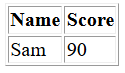
Tables often use CSS for styling.
<table border="1">

    <tr>
        <th>Name</th>
        <th>Score</th>
    </tr>

    <tr>
        <td>Sam</td>
        <td>90</td>
    </tr>

</table>
Result:
A table with visible borders.
Merging Columns
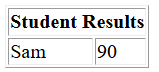
Use colspan to combine columns.
<table border="1">

    <tr>
        <th colspan="2">
            Student Results
        </th>
    </tr>

    <tr>
        <td>Sam</td>
        <td>90</td>
    </tr>

</table>
Result:
Merging Rows
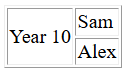
Use rowspan to combine rows.
<table border="1">

    <tr>
        <td rowspan="2">
            Year 10
        </td>

        <td>Sam</td>
    </tr>

    <tr>
        <td>Alex</td>
    </tr>

</table>
Complete Example
<!DOCTYPE html>

<html>

<head>
    <title>Lists and Tables</title>
</head>

<body>

    <h1>Lists and Tables</h1>

    <h2>Favourite Subjects</h2>

    <ul>
        <li>Digital Technologies</li>
        <li>Engineering</li>
        <li>Science</li>
    </ul>

    <h2>Student Results</h2>

    <table border="1">

        <tr>
            <th>Name</th>
            <th>Score</th>
        </tr>

        <tr>
            <td>Sam</td>
            <td>90</td>
        </tr>

        <tr>
            <td>Alex</td>
            <td>85</td>
        </trtbody>
</table>
</body>

</htmldiv>
The
Quickcaption Reference
identifies Unorderedthe List
<ul>
    <li>Item</li>
</ul>
Ordered List
<ol>
    <li>Item</li>
</ol>
Definition List
<dl>
    <dt>Term</dt>
    <dd>Description</dd>
</dl>
Table
<table>
Table Row
<tr>
Tabletable. Header
cells and <th>scopecommunicate Table Data
<td>
Merge Columns
colspan="2"
Merge Rows
rowspan="2"
You now know howrelationships to createassistive liststechnology.
Do not use tables for page layout. For narrow screens, keep the semantic table and place it inside a horizontally scrollable wrapper.
Check
Next