HTML Lists and Tables
Lists and tables are used to organise and display information on a webpage.
Lists are useful for displaying related items, while tables are useful for displaying data in rows and columns.
Unordered Lists
An unordered list displays items using bullet points.
<ul>
    <li>HTML</li>
    <li>CSS</li>
    <li>JavaScript</li>
</ul>
Result:
- HTML
- CSS
- JavaScript
Ordered Lists
An ordered list displays items using numbers.
<ol>
    <li>Plan the website</li>
    <li>Create the HTML</li>
    <li>Add CSS styling</li>
</ol>
Result:
- Plan the website
- Create the HTML
- Add CSS styling
Nested Lists
Lists can be placed inside other lists.
<ul>

    <li>Web Development

        <ul>
            <li>HTML</li>
            <li>CSS</li>
            <li>JavaScript</li>
        </ul>

    </li>

</ul>
Result:
- Web Development
- HTML
- CSS
- JavaScript
Definition Lists
Definition lists are useful for displaying terms and descriptions.
<dl>

    <dt>HTML</dt>
    <dd>Creates webpage content.</dd>

    <dt>CSS</dt>
    <dd>Controls appearance and styling.</dd>

</dl>
Result:
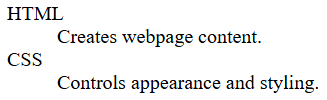
- HTML
- Creates webpage content.
- CSS
- Controls appearance and styling.
Creating a Table
Tables display information in rows and columns.
<table>

    <tr>
        <th>Name</th>
        <th>Score</th>
    </tr>

    <tr>
        <td>Sam</td>
        <td>90</td>
    </tr>

</table>
Result:
| Name | Score |
|---|---|
| Sam | 90 |
Understanding Table Elements
Tables are made up of:
| Element | Purpose |
|---|---|
<table> |
Creates the table |
<tr> |
Creates a row |
<th> |
Creates a heading cell |
<td> |
Creates a data cell |
Adding Multiple Rows
<table>

    <tr>
        <th>Name</th>
        <th>Score</th>
    </tr>

    <tr>
        <td>Sam</td>
        <td>90</td>
    </tr>

    <tr>
        <td>Alex</td>
        <td>85</td>
    </tr>

    <tr>
        <td>Jess</td>
        <td>95</td>
    </tr>

</table>
Result:
| Name | Score |
|---|---|
| Sam | 90 |
| Alex | 85 |
| Jess | 95 |
Screenshot Placeholder
Insert screenshot showing a table with multiple rows.
Adding Borders
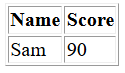
Tables often use CSS for styling.
<table border="1">

    <tr>
        <th>Name</th>
        <th>Score</th>
    </tr>

    <tr>
        <td>Sam</td>
        <td>90</td>
    </tr>

</table>
Result:
A table with visible borders.
Merging Columns
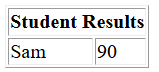
Use colspan to combine columns.
<table border="1">

    <tr>
        <th colspan="2">
            Student Results
        </th>
    </tr>

    <tr>
        <td>Sam</td>
        <td>90</td>
    </tr>

</table>
Result:
Merging Rows
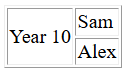
Use rowspan to combine rows.
<table border="1">

    <tr>
        <td rowspan="2">
            Year 10
        </td>

        <td>Sam</td>
    </tr>

    <tr>
        <td>Alex</td>
    </tr>

</table>
Complete Example
<!DOCTYPE html>

<html>

<head>
    <title>Lists and Tables</title>
</head>

<body>

    <h1>Lists and Tables</h1>

    <h2>Favourite Subjects</h2>

    <ul>
        <li>Digital Technologies</li>
        <li>Engineering</li>
        <li>Science</li>
    </ul>

    <h2>Student Results</h2>

    <table border="1">

        <tr>
            <th>Name</th>
            <th>Score</th>
        </tr>

        <tr>
            <td>Sam</td>
            <td>90</td>
        </tr>

        <tr>
            <td>Alex</td>
            <td>85</td>
        </tr>

    </table>

</body>

</html>
Quick Reference
Unordered List
<ul>
    <li>Item</li>
</ul>
Ordered List
<ol>
    <li>Item</li>
</ol>
Definition List
<dl>
    <dt>Term</dt>
    <dd>Description</dd>
</dl>
Table
<table>
Table Row
<tr>
Table Header
<th>
Table Data
<td>
Merge Columns
colspan="2"
Merge Rows
rowspan="2"
You now know how to create lists and tables in HTML.
Next tutorial: HTML Forms